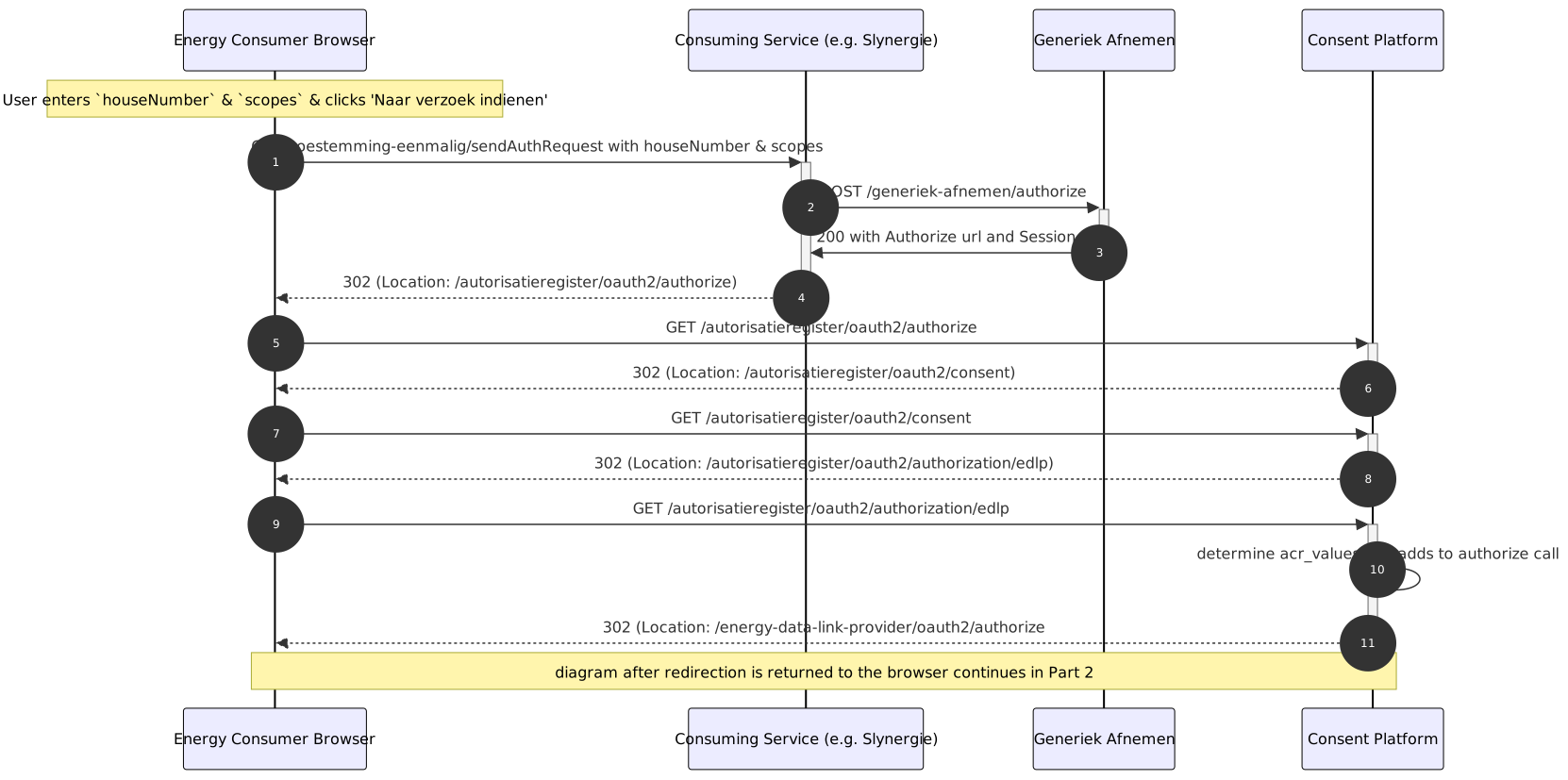
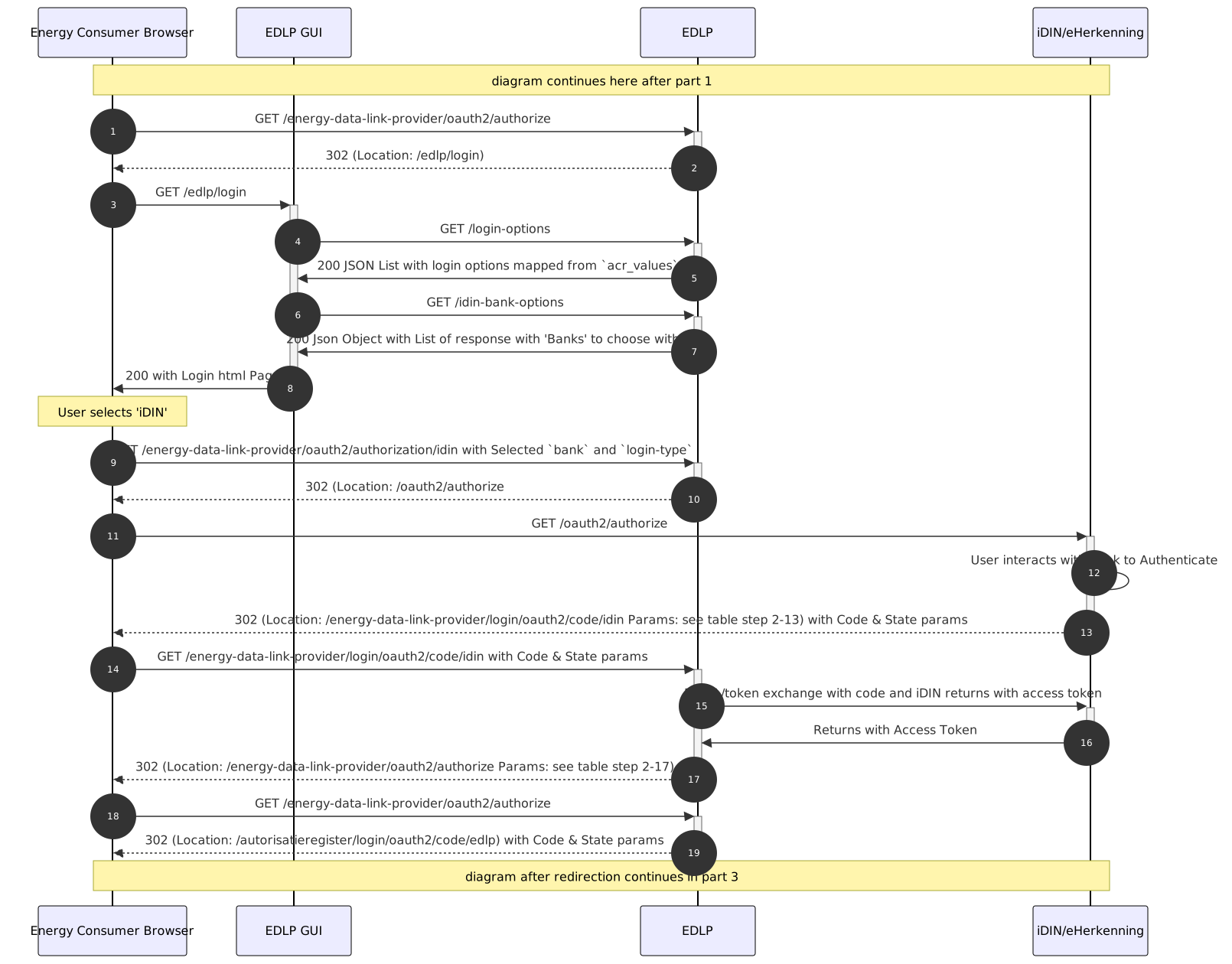
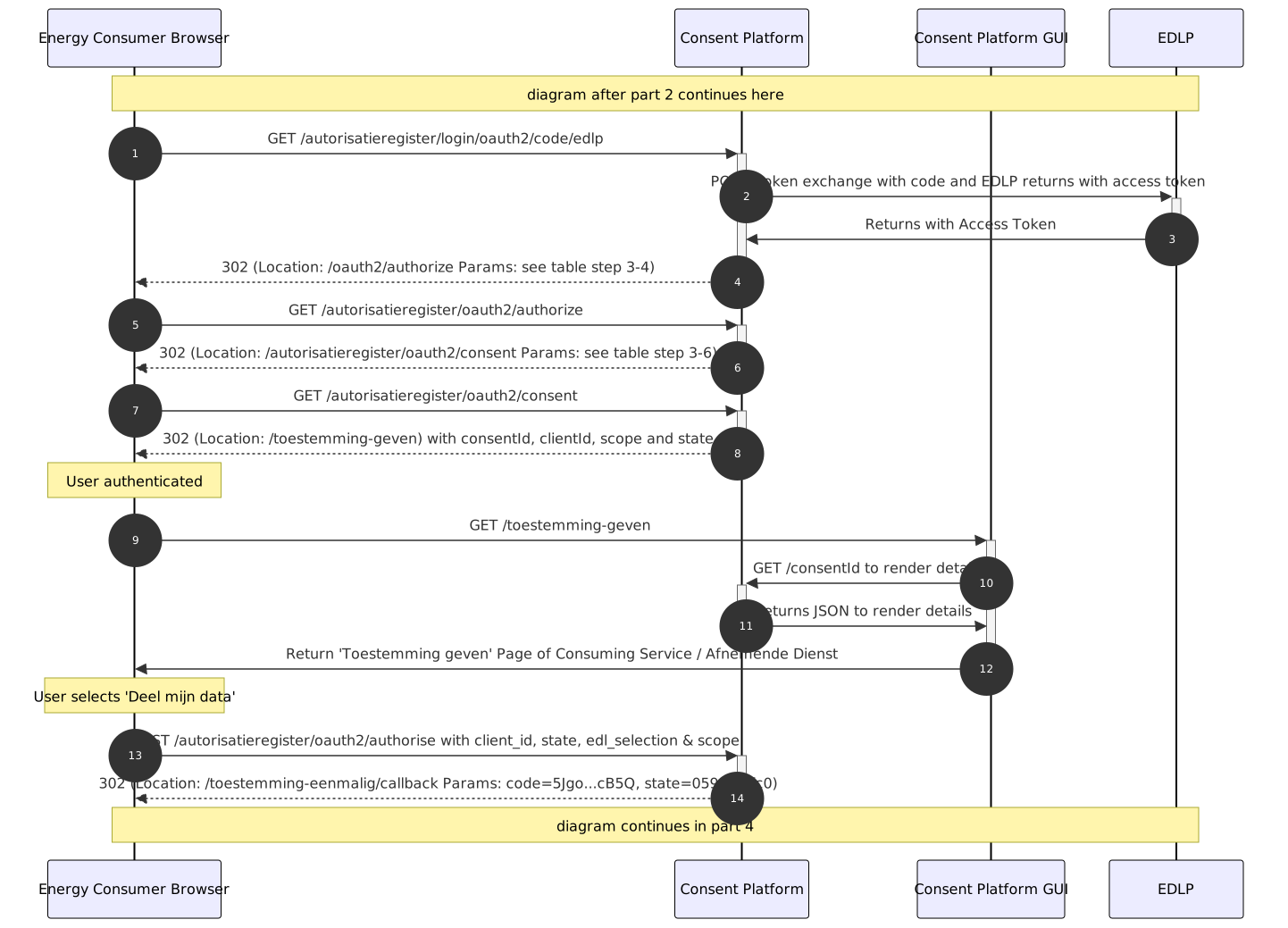
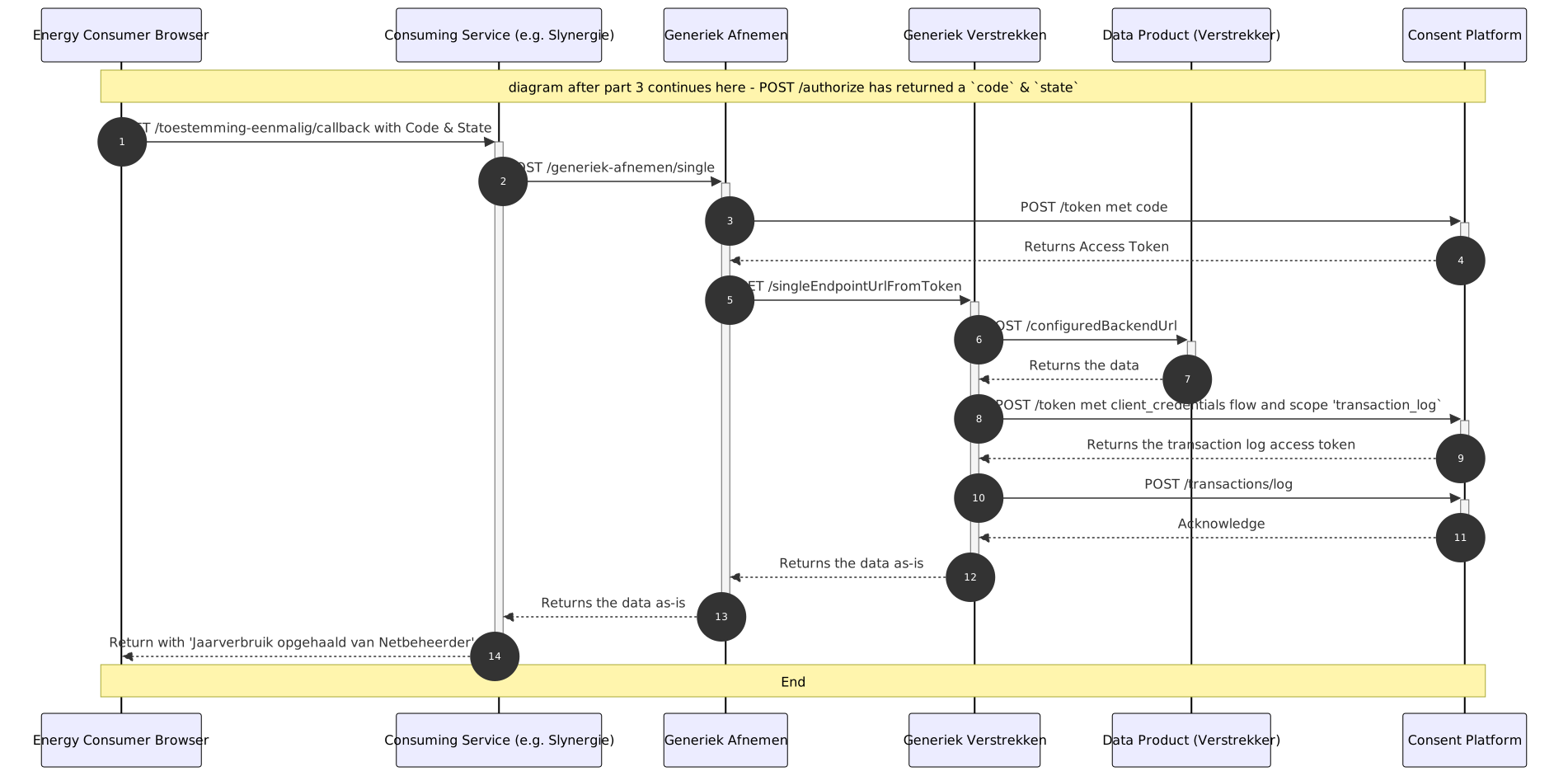
This documentation page should be used as an addendum to detailed-single-consent-flow sequence diagrams part 1, 2, 3 & 4.
SequenceDiagram part 1 - 'Identificatie AutorisatieRegister'
SequenceDiagram part 2 - 'EDLP Authorization Code Flow'
SequenceDiagram part 3 - 'Toestemming Geven'
SequenceDiagram part 4 - 'Data Ophalen'
note:
See the README to generate new/updated diagrams
The detailed table references in the first column syntax is 'part index-diagram index'.
e.g.: Step 1-5 should be read as: diagram part 1, step 5.
Table with URL parameters
# in SequenceDiagram |
Full URL Params in seqDiagram step |
Step 1-5:
GET /autorisatieregister/oauth2/authorize? |
Params:
'response_type=code'
'client_id=slynergie-eenmalig-local' which is the clientId of Slynergie for the single consent flow of the AutorisatieRegister as IDP.
'redirect_uri=http://localhost:8282/toestemming-eenmalig/callback'
'state' + is the sessionId in Generiek-Afnemer user_session table
'scope'
'verify'
'code_challenge'
'code_challenge_method' |
Step 1-13:
302 - Location: /energy-data-link-provider/oauth2/authorize? |
Params:
'response_type=code'
'client_id=autorisatieregister' - which is the clientId of AutorisatieRegister for the EDLP as IDP
'scope=openid'
'state=3Ly1…Y%3D' + 'redirect_uri=http://localhost:8080/autorisatieregister/login/oauth2/code/edlp'
'nonce=yHPT…8kMM'
'code_challenge=T7uX…u3V4'
'code_challenge_method=S256'
'acr_values=consumer:loa2,business:loa3' - see Backend Table |
Step 2-13:
302 - Location: /energy-data-link-provider/login/oauth2/code/idin |
Params:
'code=E0ls…ALeY'
'state=xXru…A%3D' |
Step 2-17:
302 - Location: /energy-data-link-provider/oauth2/authorize |
Params:
'response_type=code'
'client_id=autorisatieregister' - which is the clientId of our AutorisatieRegister as Client with our EDLP as IdP
'scope=openid'
'state=umX0…o%3D'
'redirect_uri=http://localhost:8080/autorisatieregister/login/oauth2/code/edlp'
'nonce=9GAZ…YHkI'
'code_challenge=5Q0c…wBNM'
'code_challenge_method=S256'
'acr_values=consumer:loa2,business:loa3'
'continue' - Spring Security 6 performance improvement to indicate retrieving session info from request |
Step 2-19:
302 - Location: /autorisatieregister/oauth2/authorize |
Params:
'code=-WnJ…KdVH'
'state=umX0…o%3D' |
Step 3-4
302 - Location: /oauth2/authorize |
Params:
'response_type=code'
'client_id=slynergie-eenmalig-local'
'redirect_uri=http://localhost:8282/toestemming-eenmalig/callback'
'state=0590…9fc0'
'scope=consumption_data'
'verify=8',
'code_challenge=BRFY…a8Am'
'code_challenge_method=S256'
'continue' - Spring Security 6 performance improvement to indicate retrieving session info from request |
Step 3-6
302 - Location: /autorisatieregister/oauth2/consent |
Params:
'scope=consumption_data'
'client_id=slynergie-eenmalig-local'
'state=j1U0TvpWBIVQ1zSSjNLtubXMu42s2qvjiD_DkJEKEe4='
|
Step 3-8
302 - Location: /toestemming-geven |
Params:
'consentId=59a3…b3b1'
'client_id=slynergie-eenmalig-local'
'scope=consumption_data'
'state=ubj2…0%3D'
|
Table elaborating Backend process steps
# in SequenceDiagram |
Description of Backend interactions |
Step 1-2 & 1-3 |
Generiek-Afnemen receives POST '/generiek-afnemen/authorize' from Afnemer (Slynergie BV) and processes this in the AuthorizeApiController#initializeAuthorization. This generates an AuthorizeResponse with:
1. codeVerifier for PKCE code-challenge & method.
2. starts a UserSession and stores it in the user_session repository table and adds its id as 'state' parameter
3. a callback to '/mock-afnemer/toestemming-eenmalig/callback'
4. a 'scope' parameter 'consumption-data'
|
Step 1-10 |
EDLP determines new 'acr_values' based on the ones retrieved in the /authorize call. In the case of iDIN selection, the 'signicat-profile', 'login-hint' is also added to the /authorize call in the redirect.
e.g.: acr_value 'consumer:loa2' maps to 'urn:signicat:oidc:method:idin:less-info' |
Step 2-4 & 2-5 |
EDLP GUI performs GET request to EDLP to retrieve login-options; JSON response |
Step 2-6 & 2-7 |
EDLP GUI performs GET request to EDLP to to retrieve idin-bank-options; JSON response |
Step 2-1 & 2-2 |
EDLP BE gets /authorize request and redirects to EDLP gui login page |
Step 3-14 |
302 Redirected to original authentication request: /toestemming-eenmalig/callback with 'code' and 'state' params |